Ographis saves the map job, not just the map
Magnus Nilsson’s new desktop GIS preview puts the visual workflow and the command-line run in the same file. That is more interesting than another way to draw buildings.
Inês Valente
Journal editor, Lisbon

The buildings are the easy thing to notice. In the announcement for Ographis, Swedish geodata becomes a model that can be taken into Blender. Roads get clipped to an area of interest. OpenStreetMap buildings rise into a 3D scene. What interests me is the less photogenic bit: the instructions for making those things can survive as a file, rather than as someone’s memory of a desktop session.
Magnus Nilsson, a GIS practitioner based in Gothenburg, announced the first public release on 27 October 2026. He describes it as a tool tailored to his own GIS and mapping needs. This is a preview, not a finished alternative to an established GIS package. His instruction is unusually direct: do not use it for production.
One file, two ways to run it
Ographis is a native desktop application written in Rust. You connect inputs, processing tools and outputs on a canvas. Click a node to inspect the data in a table, on a map or in 3D. The repository’s README pairs two examples: open examples/skaraborg.ographis in the graphical program, or give that same file to og run at the command line. The documented command-line path supports variables, run history and exit codes, so a saved job can also be scheduled.
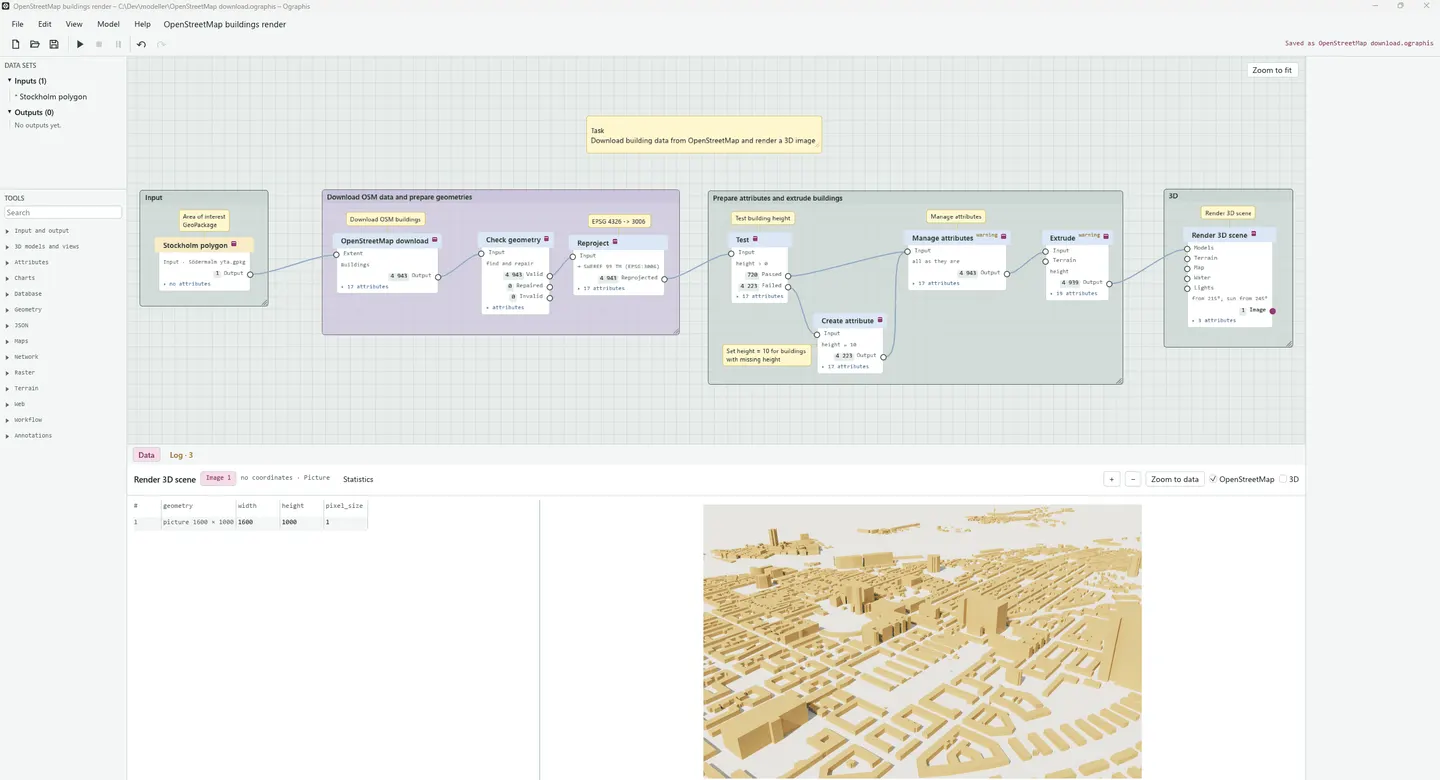
That shared file is the useful promise. A visual editor helps you work out a transformation; a command-line runner lets you repeat it without reconstructing the clicks. It does not prove that the result is correct, or that next month’s source data will behave. It does make the procedure something another person can inspect and run.
The release post gives that promise a specific destination. Nilsson says glTF export was not part of his initial plan, but now makes Ographis useful for preparing vector geodata for Blender. His example uses data from Lantmäteriet, Sweden’s mapping authority. The point is not to keep the whole job inside a new application. There is an output another tool can use.
Read the awkward details
I read the design notes on 29 October. They are a better reason to pay attention than a long list of supported formats. A buffer refuses coordinates in degrees and asks for a reprojection. A point on the boundary between two areas counts in both, receives the first area’s attributes, and triggers a warning. Those are decisions that change an answer, not decorations around it.
There is a particularly useful warning about GeoJSON: it is written in the stream’s coordinate system. Software expecting WGS 84 may not read that correctly, so the notes tell you to reproject before writing a file for the web. A successful export is not the same as an interoperable one. This is exactly the sort of distinction I want a young data tool to put in writing.
Free is not a support contract
The code is available under MIT or Apache 2.0, at the user’s choice, with no licence fee. The README also says this is one person’s spare-time hobby project, that replies may take a while, and that the code is written by Claude under human GIS guidance. It explicitly says the application is not well tested. Those admissions belong beside the download, not hidden behind the word open.
I have not built Ographis or checked the numerical results. The documented Linux build requires GDAL; the Windows instructions describe Rust and OSGeo4W. There is setup work here, and the release warning rules out handing it an urgent client deliverable. For a spare copy of a dataset and a repeatable task you already understand, though, there is something worth examining: save the recipe, run it twice, then check whether the answer deserves to travel.
Find your next European tool
Every product in the directory is reviewed by a person and shows where it’s made. Start with a tool you use today.
Explore the directory
